
Construction financials that work the way builders actually build.
WIP report for your bank. Live profit margin. AIA-style pay apps. AR aging. Open-book mode for the homeowners who want to see every dollar. All from a phone you already carry — no $12,000-a-year back-office subscription required.
PDFs for your bank in three taps.
The three reports your banker, owner, and CFO ask for first — built once and exported instantly. Branded with your logo, your contact info, your license number. Copy a CSV to paste straight into QuickBooks or Excel.
- WIP report Business · $79 — contract, change orders, % complete, billed, paid, retainage, EAC, projected profit, margin per project. PDF + CSV. When a job goes upside down the full anticipated loss is booked immediately rather than spread across the remaining percent complete — the treatment ASC 605-35 requires for construction-type contracts, and the one a surety underwriter checks for.
- Profit by project Free — running margin across the whole portfolio with green / yellow / red health bands.
- A/R aging Free — open invoices bucketed 0–30 / 31–60 / 61–90 / 90+. Worst-aged first.
- One-click PDF export, branded with your company.
- One-click CSV copy for accounting handoff.
- Auto-recompute every time a commitment, invoice, or CO changes.
The transparency homeowners actually want.
Flip a project into Open Book mode and the homeowner sees every dollar — budget, committed, actual, projected final cost — by phase. Run a GMP contract and they see real cost vs. the cap, with savings shared by the rules in your contract. The kind of trust feature enterprise PM software doesn't ship for residential because it's not who they're selling to.
- Toggle Open Book or GMP on any project — fixed-price contracts stay private by default.
- Per-phase breakdown: framing, electrical, finishes — each with budget vs. actual.
- GMP cap surfaced with live "vs. cap" delta. Overruns flagged, savings highlighted.
- Contractor fee (% or flat) shown transparently — builds trust the right way.
- Auto-updates every time you sign a sub commitment or pay an invoice.
- Render in the live portal — no separate spreadsheet to maintain.
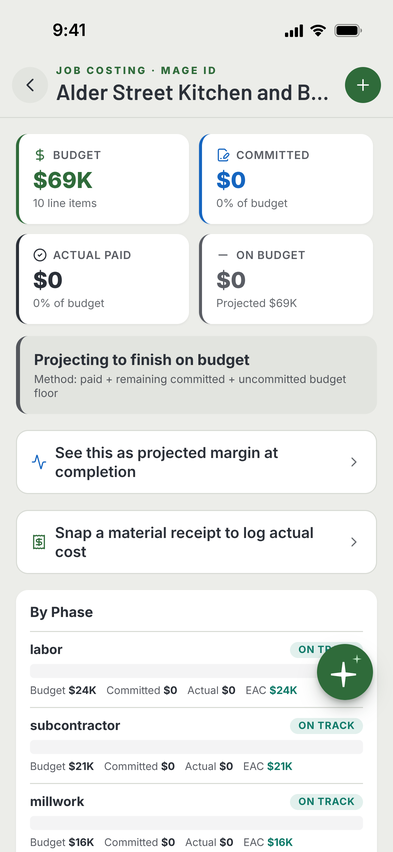
AI-assisted takeoffs, editable line items.
Start from plans, notes, or a photo — the AI drafts a takeoff. You edit, add, remove. Day one, material prices are adjusted for where you build: ten regional factors and twenty metro adjustments, so a Bay Area bid is not priced off a Tulsa number. It is a starting point and we say so on the screen. From the first receipt onward it is your numbers — snap a supply-house invoice and those unit prices go straight into a price book only you can see, the same day, without waiting for the job to close.
- AI takeoff from plans, notes, or voice description
- Line items with quantity, unit, unit price, and total
- Regional cost factors on day one; your own supply-house invoices from the first receipt
- Labor, equipment, overhead, and profit rows
- Schedule of values (SOV) auto-generated from estimate
- Side-by-side comparison of bid vs. as-built costs
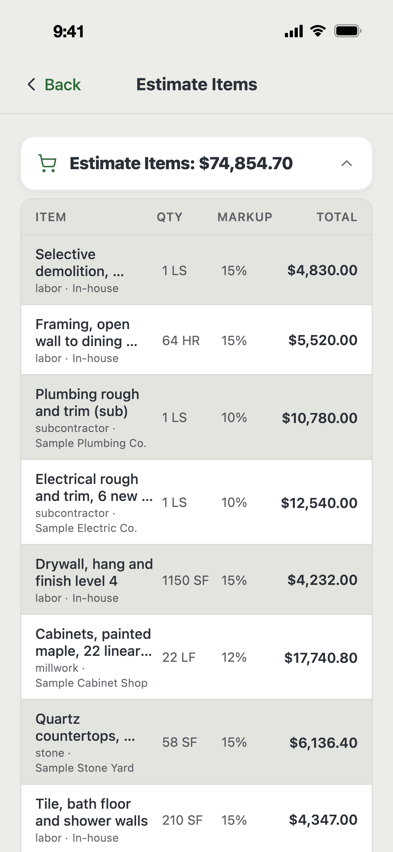
G702 & G703, one tap away.
Progress billing in the G702/G703 layout architects and lenders are used to. Retainage, stored materials, prior billings — all calculate correctly. Export as PDF or send it to the client portal, where your client can review it — and pay it online when you take payments through MAGE ID.
Watch How: Bill With a Pay App
- AIA-style G702 summary auto-filled from schedule of values
- AIA-style G703 line-item continuation sheet
- Retainage (standard or variable per line) handled automatically
- Stored materials separate from work-in-place
- Prior billing totals carried forward
- PDF export in the G702 format — all nine lines: original contract sum, net change by change orders, contract sum to date, total completed and stored to date, retainage split across completed work (5a) and stored material (5b), total earned less retainage, less previous certificates, current payment due, balance to finish — plus the G703 continuation sheet and the change-order summary
- Shared to the client portal with a Pay button when you take payments through MAGE ID (Stripe)
Simple invoices, Stripe-ready payments.
Not every project needs AIA-style billing. Simple invoices for smaller projects, time-and-materials jobs, or ad-hoc charges. Save to project first; send when ready. Stripe-powered pay link when you want the money fast.
- Line-item invoices or lump-sum
- Partial payment tracking (deposits, progress, final)
- Save to project then send later, or send + save in one tap
- Stripe pay link for same-day ACH or card payment
- Aging report: 0-30 / 31-60 / 61-90 / 90+ buckets
Portal-approved change orders. No PDF ping-pong.
Draft the CO with line items and schedule impact. Send to the owner through the client portal — they approve or reject with an e-signature, right on their phone. Approved COs automatically extend the schedule and update the contract total.
Watch How: Write a Change Order
- Line-item pricing with markup and tax
- Schedule impact (days added) that auto-applies on approval
- AI impact analysis: downstream risks flagged
- Owner e-signature from the client portal
- Status lifecycle: draft / submitted / approved / rejected / void
- Running total shown on the main project dashboard
Know what's coming in vs. going out.
Weekly inflow and outflow projections from scheduled invoices, material commitments and labor. Look 4, 8 or 12 weeks ahead, six months, a year, or a span you type in. Know when you’re tight and when you’re flush before it happens.
- Rolling weekly cash flow view
- Inflows from scheduled pay apps and invoices
- Outflows from material POs, labor, and overhead
- Multi-project roll-up for total company cash position

PV, EV, AC, CPI, SPI — the full EVM panel.
Classic earned value metrics calculated continuously from your schedule and committed costs. Know whether you're ahead of schedule, under budget, or in trouble — with numbers that match what any PMP or federal PM expects to see.
- Planned Value (PV) from the baseline schedule
- Earned Value (EV) from % complete × budget
- Actual Cost (AC) from committed + paid costs
- Cost Performance Index (CPI) and Schedule Performance Index (SPI)
- Estimate at Completion (EAC) and Variance at Completion (VAC)
- Classic S-curve visualization (PV / EV / AC over time)

See which invoices are likely to pay late.
The AI reads your open invoices and how this client has paid on this job so far, then estimates which invoices will pay on time and which will run late. It uses your own records only, never other contractors’ data. Use it to time your bills, or to follow up on the ones it flags. It is an estimate, not a promise.
- Per invoice: the chance it pays on time, a likely pay date and a risk level
- A suggested next step for each invoice it flags
- Money expected in over the next 7, 14 and 30 days
- Invoices it could not forecast are called out, not quietly left out of the totals
- Opens from the Cash Flow screen
Everything else your books need.
The rest of the financial toolkit — the stuff you probably juggle in three different spreadsheets today.
Budget vs. actual
Real-time variance per line item. Overruns flagged before they compound.
Purchase orders
Issue a PO to a supplier as a PDF from Job Costing. Snap the supplier’s invoice and link it to the PO to track what you spent against it.
Retainage tracking
See what's held, when it releases, and how much owes to which sub.
Sub invoice intake
Subs submit their own invoices to you through the app. You review, approve, pay.
Tax and overhead
Set the tax rate on an invoice or change order. Overhead burden on labor.
QuickBooks sync
Native 2-way sync with QuickBooks Online — invoices and payments push out (Pay-link payments and any failed push go over on the next 30-minute reconcile), QBO payments reconcile back, and QBO bills land in a cost-review queue you approve line by line. CSV export for Xero.
Lien waivers
Conditional & unconditional, partial & final — generate, request, sign, archive. PDF on tap.
1099 export
Sub payments rolled up by sub for the year, with the subs over the filing threshold flagged and missing tax IDs or W-9s called out. A CSV your accountant can map.
Insurance audit pack
For your workers’ comp premium audit: every sub payment lined up against the certificate on file for that date. It says what the records show, and “can’t tell” is never shown as covered.
Sub scorecard
Every sub graded from your own job data, with the one thing that drove each grade. On Pro.
Good, better, best proposals
Turn an estimate into a three-option proposal. The client sees prices and what each includes; your markup stays in the app. On Pro.
Closeout binder
Auto-compiled at handover. Selections, warranties, maintenance schedule, trade contacts, claim instructions — one PDF the homeowner keeps forever.
AI-curated selections
Tile, fixtures, paint, flooring: four options per category, from a budget pick to a premium one, each with brand, product line, supplier and a price estimate. Homeowner picks from the portal.
Pre-bid Q&A
In Testing Bidders ask clarification questions on a posted project, and your answer is visible to every bidder. Posted projects don’t reach contractors yet, so this is not in use today.
Contract e-sign
Send, sign, and store the build contract in-app. Homeowner signs from the portal. No DocuSign subscription.
Photo markup
Drop arrows, circles, and labels on any site photo. Sub sees exactly which window, which gap, which color — homeowner does too, in their portal.
Homeowner portal binder
Closeout binder lives in the portal. Year three, when they need to find the paint code or HVAC sub's number — it's still there.
Real-time client signals
Homeowner picks a tile or signs the contract, and you get a push notification the second it happens. Nothing slips through.
6-language homeowner portal
English, Spanish, Brazilian Portuguese, Mandarin, Vietnamese, French. AI daily summaries land in the homeowner’s language. The trades aren’t monolingual — your portal shouldn’t be either.
Sub portal: scope, schedule, billing
Subs see their punch items, their schedule slice, and their invoice history — without an account or a login. Submit invoices through the same link.
Voice-to-daily-report
“Today: 4 framers, 2 yards concrete delivered, no issues.” Tap to dictate. AI pre-fills the report; you see exactly what it heard before saving.
Handover checklist
Selections confirmed, punch list cleared, warranties on file, binder delivered, final invoice paid, lien waivers collected — every box that needs to be ticked before keys change hands. Status computes live from project data; one screen tells you what’s blocking.
AI homeowner daily digest
Your technical daily report rewritten in 2-4 plain-language sentences, in the homeowner’s language. Sits at the top of their portal as the “Latest update.” You review, you publish.
Tight books, smooth projects.
What sits where. AIA-style G702/G703 pay applications, job costing, change orders, invoicing, A/R aging, the client portal, cash flow and lien waivers are all on Pro, $29/mo. The WIP schedule, the portfolio margin board, Cost X-Ray and QuickBooks Online sync are on Business, $79/mo.
Why the split: a WIP schedule is the report your surety and your bank read, and the number only means anything once every commitment, receipt and pay application is in the system. It is a bigger shop's tool and it is priced like one. For comparison, Knowify's cheapest plan that includes AIA-style billing is $99/mo for one user and does not include WIP — WIP starts on Knowify Advanced at $329/mo billed annually. Both prices are their published rates, checked September 2026; verify them before you buy.
Start free