
See how MAGE ID actually works.
Real screens from the app, walked through step by step — from a plan upload to a bid confidence score to a sent estimate. Start free right now, or book a live 30-minute demo and we'll run it on your own plan set.
See the number before you send the bid.
Every finished job teaches MAGE your real costs — your subs, your supply house, your market. Your next estimate gets a bid confidence score priced off your own numbers, not a generic catalog. Then a live margin-risk alert flags erosion during the job, not after the final invoice. The screens below show the whole loop.
 Step one: upload the plan set
The core loop, on real screens: drop a plan set, the AI reads it and prices a starting estimate, and every line carries the reasoning behind the number. Start free and try it on your own plans →
One project, end to end.
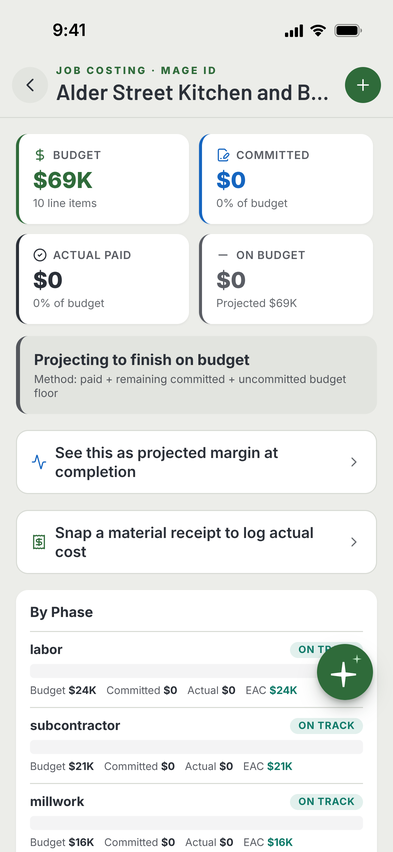
A single job carried across every screen — plan upload, AI takeoff, sub-trade buyout, schedule, AIA-style pay app, client portal. The tour below breaks each piece into its own screen.
 A live job in MAGE ID
Feature by feature.
One real screen per feature, with what it does. Want to see any of these in motion on your own project? Start free or book a live demo.
Drop in a PDF, get LF / SF / EA quantities
Upload a residential plan set. Watch the AI categorize walls, doors, windows, finishes, and fixtures. Edit a row. See where the number came from.
Pair PT-1 with the actual paint product
Upload the architect's spec PDF. The AI maps every callout code to manufacturer + product + finish + SKU. Unmatched codes flagged for RFI.

One tap. Eight to twelve buyout packages.
Turn the takeoff into draft buyout packages with auto-written scope text. Send to subs without leaving the app.
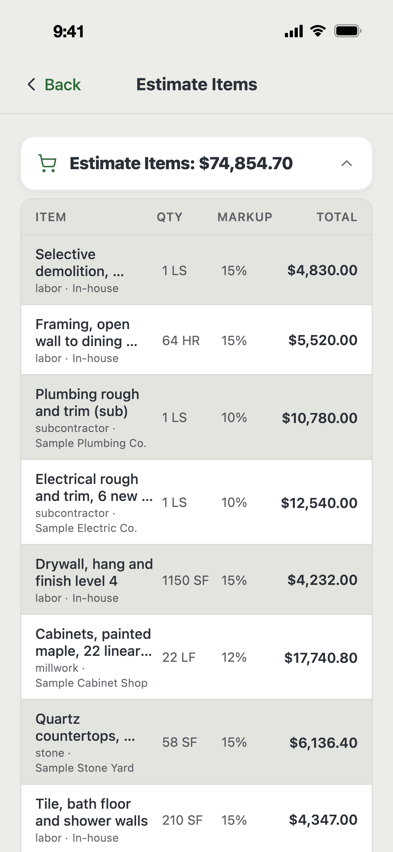
Plans → priced starting estimate
Different from takeoff. The AI returns a priced CSI-organized estimate with reasoning + a list of concerns — what the AI doesn't know, what to RFI.

G702 + G703 generated in two minutes
The bank-formatted pay app for institutional and HNW projects. Add line completion %, retention, prior pay apps. Send the PDF.

Voice it in. AI structures it.
Tap the mic, talk for 30 seconds about your day. AI fills the manpower count, work performed and incidents, and the weather reads in on its own. You review and ship.
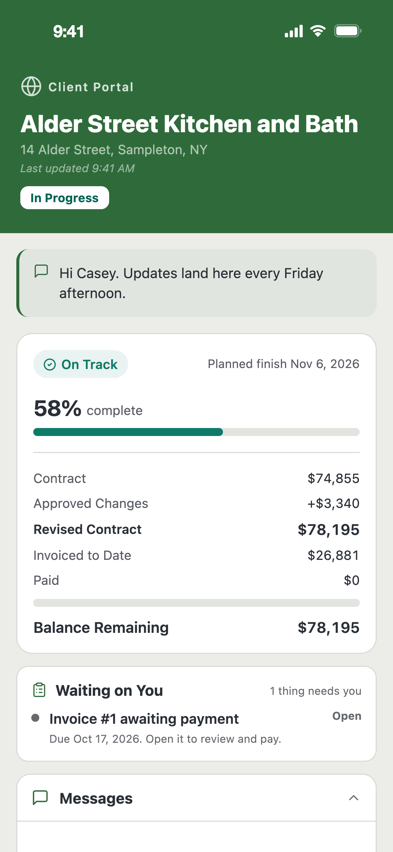
What the homeowner sees
Live updates, change orders for approval, photos, schedule, the open-book budget if you toggle it on. Six languages. Passcode-protected.
Subs upload invoices, you get notified
One private link per sub. They drop invoices, COIs, lien waivers. You approve or reject each one, with notes.

AI draft a Gantt from your estimate
Estimate → Auto-Schedule. Phase Gantt with critical path. Weather risk overlaid. Drag a task, dependents update.

12 weeks ahead. Across all your jobs.
Sees your invoices, AIA-style pay apps, sub commitments, payroll, overhead. Tells you which Friday you're short on cash.

Snap a photo. Verify the AI.
On site, tap any takeoff row. Snap a photo, GPS attaches, type what you measured. AI vs. field delta in green / yellow / red.

Universal mic for RFI, CO, punch and invoice
Tap Ask MAGE, then Voice Capture. Speak. AI structures it as the right form. No typing on the jobsite. Hands-free daily report.
Get unstuck.
Short guides for the questions that come up first, and Watch How clips that show each task on the real app, tap by tap. Or email us. A real person answers.
Getting started
Sign up, create your first project, add your team in 5 minutes.
AI takeoff how-to
Best PDF resolution, scale tips, why a row got medium confidence.
Estimating
Wizard, Quick Estimate, materials database, regional pricing.
AIA-style pay apps
Setting up the schedule of values, retention, sending to the bank.
Client portal
Inviting homeowners, what they see, six languages, open-book mode.
Offline mode
How writes queue on bad reception and sync the moment you're back.
Voice tips
Best phrasing for RFIs, change orders, daily reports, punch items.
Talk to us
Stuck? Email help@mageid.app. Omir, who built it, answers.
Watch How
Estimates, change orders, daily reports, pay apps and more, one tap at a time.
Frequently asked.
If we missed yours, the support page has a longer list.
How accurate is the AI takeoff?
What types of plans does it work on?
Can I export quantities to Excel?
Does it run offline?
What happens to my data if I cancel?
Is there a free trial?
Do you integrate with QuickBooks?
QuickBooks Desktop and Sage: no, and not planned. If your books live there, that is a fair reason to buy something else — we would rather say so now.
Do you have an Android app?
What's the price?
Ready to run it on your own project?
Start free on the web right now — your first project is $0 forever, no credit card, no download. Or book a live 30-minute demo: we screen-share, you upload one of your real projects, and you keep the takeoff and matched specs whether you sign up or not.